
Bing DMCA (2026): How to File a Bing Copyright Takedown
Bing DMCA (2026) guide: learn how to file a Bing copyright takedown, submit the right source URLs, avoid common mistakes, and understand delisting vs removal.
- Bing takedowns use Microsoft's Notices of Infringement form.
- Only the copyright owner or their authorised representative can file.
- Bing delists results; the content stays on the original site until you remove it there.
- For intimate images, Microsoft has a separate Report a Concern route.
On this page
Delisting vs removal: what Bing can do
A Bing takedown removes the link from Bing's search results. It doesn't delete anything from the website hosting your content. Microsoft's own form says the information will remain available on the original website. That's why a Bing notice works best alongside a notice to the site itself.
Before you start
- Your full name, mailing address, phone number and email.
- A description of your original work, ideally with a link to it.
- The Bing result URLs that point to the infringing pages. You can list many in one notice.
- Your signature (electronic is fine).
How to file a Bing copyright takedown
- 1Open the formGo to the Bing Notices of Infringement form.
- 2Choose the content typePick web, images or video, depending on where the result appears.
- 3Enter your contact detailsUse details you're comfortable sharing: Microsoft may forward notices to third parties, including the person who posted the content.
- 4Identify your original workDescribe it and link to where you published it.
- 5List the infringing URLsPaste each URL that shows your content. Be specific: one line per page or image.
- 6Sign and submitTick the good-faith and accuracy statements, add your signature and submit.
You can also email notices to [email protected]. Microsoft says postal notices are processed substantially more slowly.
The form, field by field
Here's what the form looks like and what to enter. Fields outlined in pink are the ones you need to fill in; the numbers match the notes under each screenshot.
1. Search type and contact details
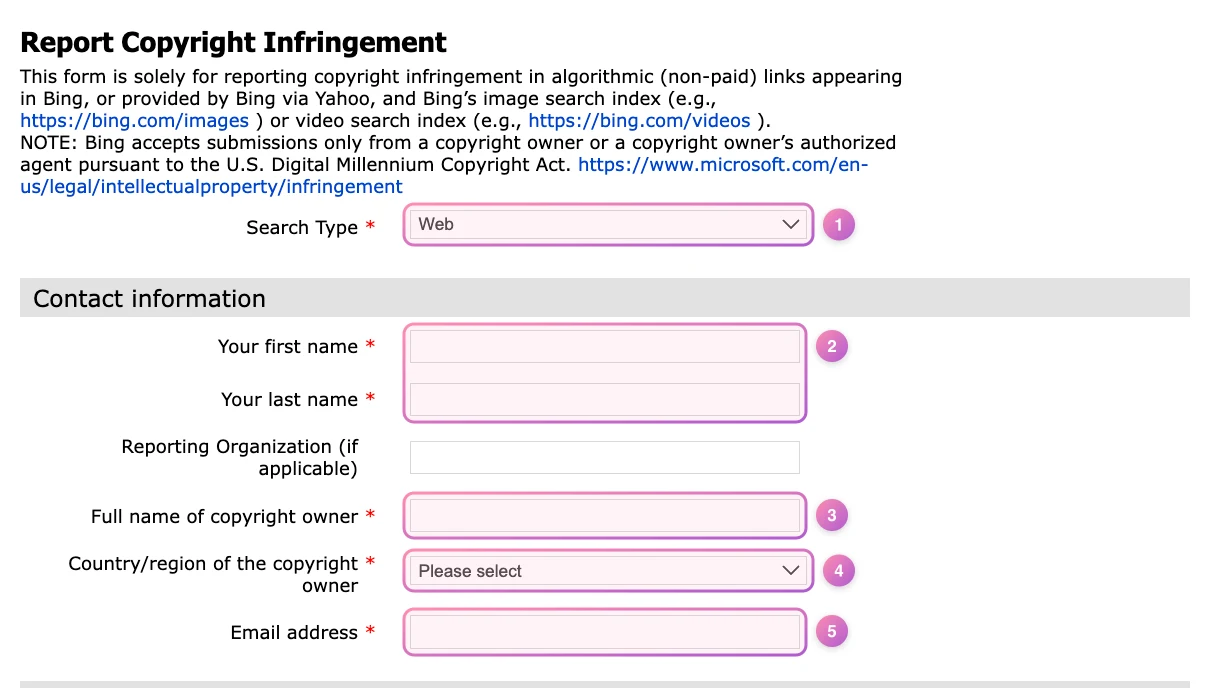
- Search type. Web for pages in search results, or Images or Video for those searches. File a separate notice for each.
- Your name. Your first and last name, or your agent's if someone files for you.
- Copyright owner. The legal owner of the content: you, or your business if you have one.
- Country or region. Where the copyright owner is based.
- Email address. Use a business email. The form warns that what you submit may be shared, including with the person you're reporting.
2. Your original work
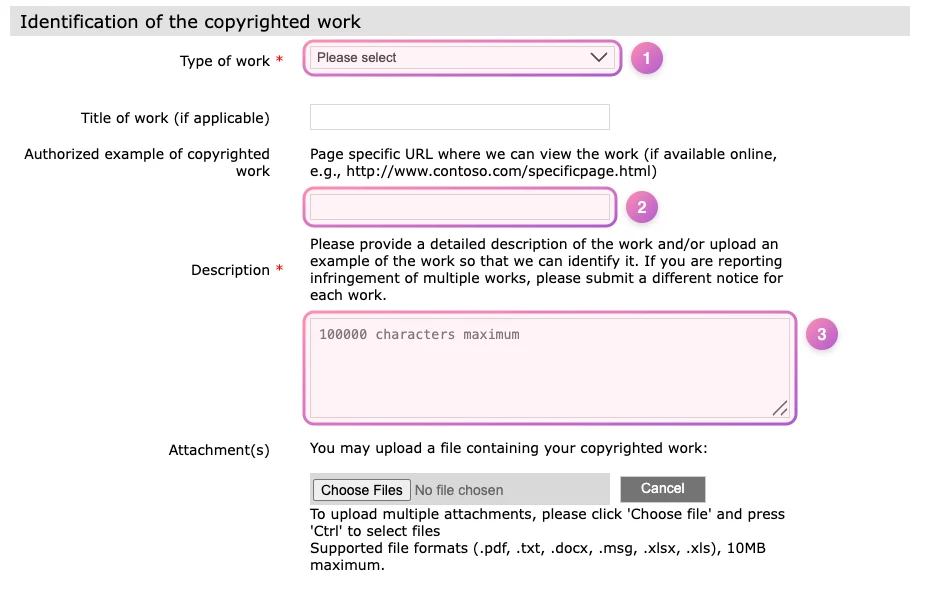
- Type of work. Choose the closest match, such as a photograph or video.
- Authorized example. A link to where you published the original, like your profile page. It's optional, but it helps Bing confirm the work is yours.
- Description. Describe the content in a sentence or two. Bing asks for a separate notice for each work.
3a. Web and video: the URLs to remove
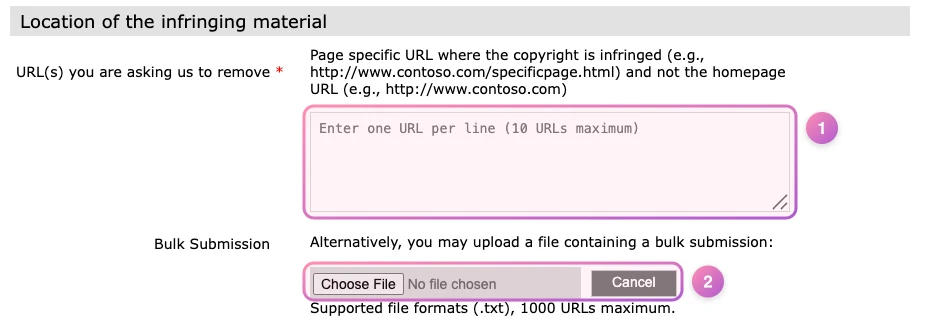
- URLs to remove. The exact page URLs that show your content, one per line, up to 10. Never the site's homepage.
- Bulk submission. More than 10? Upload a .txt file with up to 1,000 URLs.
3b. Image search: page and image URLs
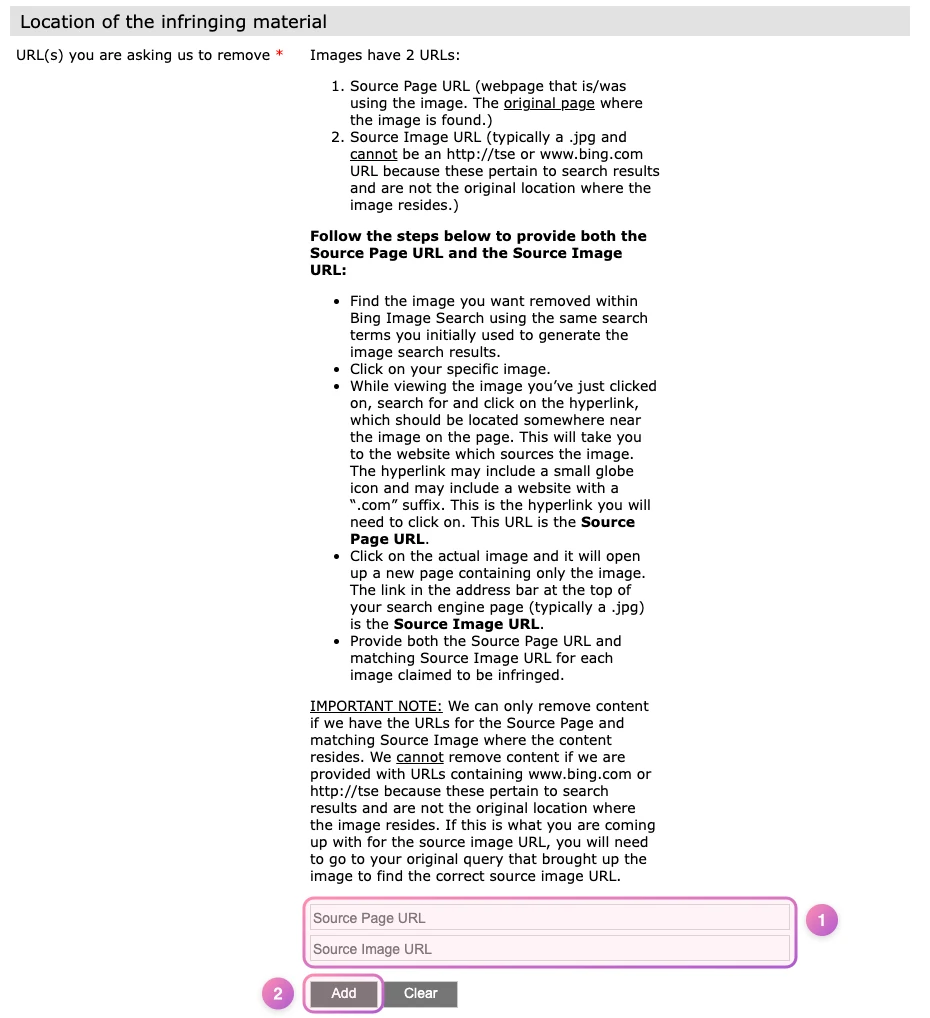
- Source page and image URLs. Add both: the page that shows the image, and the image's own address (usually ending in .jpg). Links containing bing.com won't work.
- Add. Click Add for each pair, then repeat for every image.
4. Statements and signature
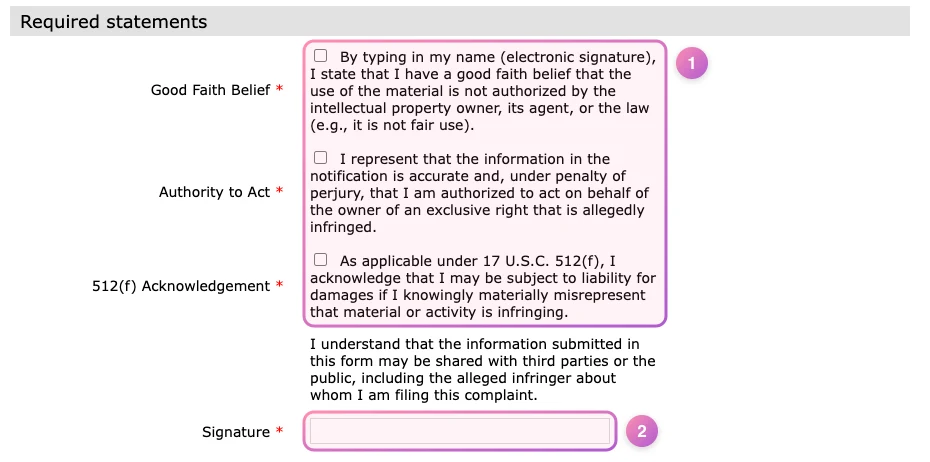
- Statements. Tick all three. They're made under penalty of perjury, so only report content you own or are authorized to act for.
- Signature. Type your full name as your electronic signature.
For intimate images: use Report a Concern
If you're reporting as the person shown, rather than as the copyright owner, Microsoft's Report a Concern page covers non-consensual intimate imagery, including synthetic images. After review, Microsoft removes the links from Bing globally. Microsoft also pilots hash matching with StopNCII.org in Bing image search.
What happens next
Microsoft doesn't publish a fixed response time. Keep a note of what you submitted and when, and recheck the results after a few days. If a URL is still showing, resubmit it with clearer details.
Common mistakes
- Reporting the homepage instead of the exact page or image URL.
- Only filing with Bing. The content still lives on the site and in other search engines.
- Using the copyright form for privacy issues, or the other way round. Pick the route that matches why you're reporting.
- Reporting content you don't own. Knowingly false notices carry legal risk.
- Bing Notices of Infringement formCopyright takedowns
- Microsoft IP infringement pagePolicy and alternatives
- Microsoft Report a ConcernIntimate images and other concerns
This guide is general information, not legal advice. Platform forms and policies change, so check the official pages linked above before you file.